

5-Card Friday
A Bi-Weekly Update from the ITS UX Team
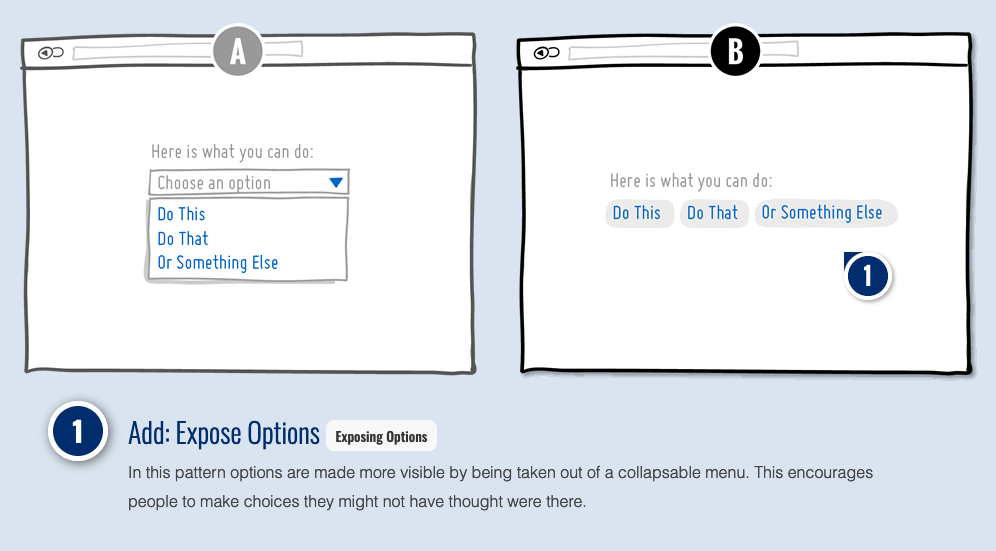
UI Pattern: Exposed Menu or Dropdown Options
One of the user interface (UI) design patterns the IUX Team has encountered involves when to use a dropdown vs. when to expose the menu/dropdown options to the user.
By choosing the correct pattern for the web application, you can save users from making extra clicks and streamline form conversions.
We're constantly re-evaluating our patterns and rules for using them for our Pattern Library, and exposed menu options is soon to be included.
Flip the card over to learn more about this UI pattern.
Exposed Menu Options & the IUX Pattern Library
Our Pattern Library rule as of now, is that for menu options or filters, to try a pattern of exposing the options on the UI (e.g., a button group, either a radio button design for a single select or checkbox design for multiple select). And for dropdowns, to use an try using an exposed value design if there are 5 of less select options.
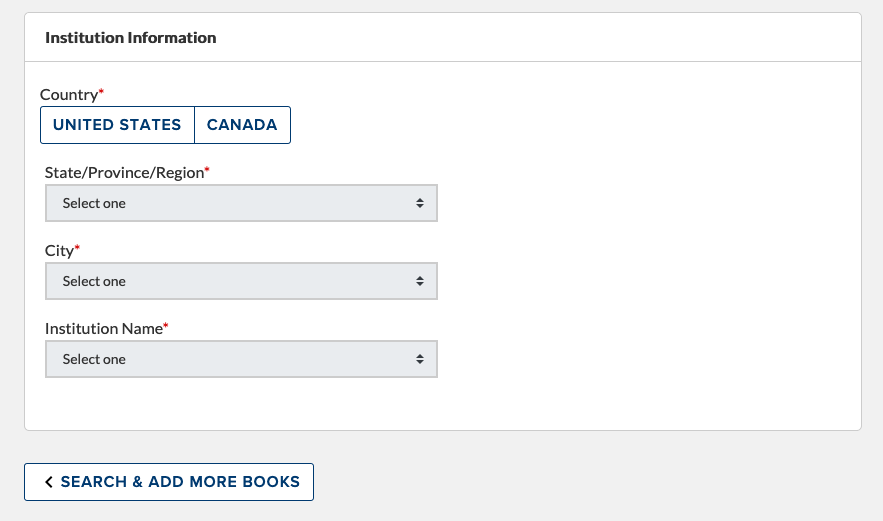
When we worked on the UI for the Course Adoption System (CAS), the only values in the Country dropdown were Canada, Mexico, and the US. This further was simplified to just Canada and the US. A dropdown design for just two values seemed strange, so we explored using a Bootstrap button group design instead.
View an example of how we used the exposed menu pattern for the Country field in the Course Adoption System.
View more examples
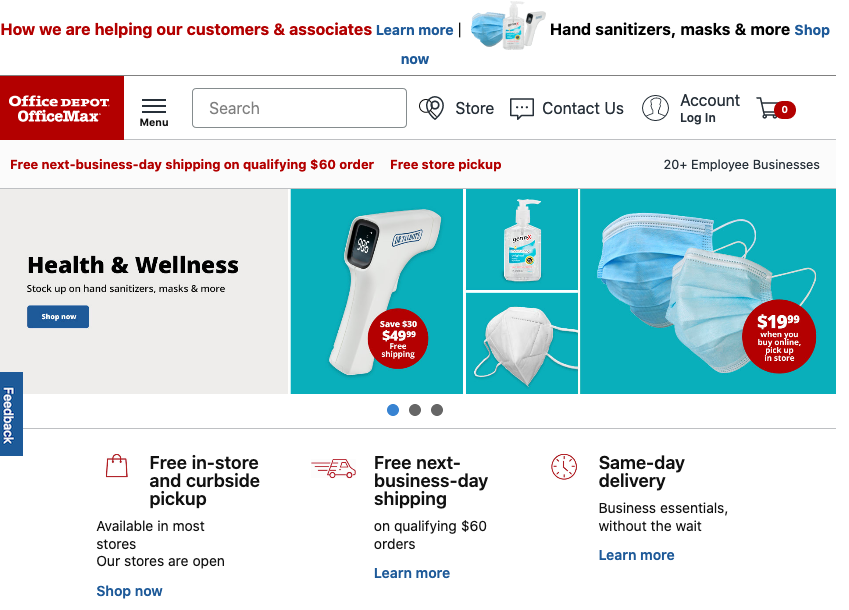
Communicating Changes Throughout the Buyer's Journey: A COVID-19 Case Study
This recent article from NN/g explores how ecommerce has changed for both retailers and consumers due to the COVID-19 pandemic.
When emergency situations impact retail operations, stores must inform customers of resulting changes to services with salient communications across all channels.
Learn more on the back of this card.
How the COVID-19 Pandemic Has Changed Ecommerce
In this article from NN/g, design guidelines are provided for effectively communicating changes to the ecommerce customer journey, from product discovery to delivery, during this unprecedented time.
- Communicate potential shipping delays as early as possible. Don’t wait until the user visits the shopping cart and checkout pages to mention delays.
- Important COVID-19–related notifications should stand out visually so people can easily discover them.
- During emergencies, all ecommerce sites should have some discoverable messaging about shipping, whether delays can be expected or not.
- If there are product specific delivery delays or purchasing limits, layer the communications across relevant pages.
- Don’t rely only on a single banner message on the homepage and product or category pages. Information should also be provided at checkout.
- Inform customers as soon as possible regarding operational issues causing delays in automatic shipments or subscription orders.
- Retailers with changes to brick-and-mortar operations, such as store closures and curbside-pickup changes, should detail these changes on the homepage and at relevant places where specific store locations are referenced.
- Retailers supporting curbside pickup should communicate the basics of the process on the home page and at checkout.
- Revisit automated transactional emails related to orders of products and services. Ensure critical changes are communicated and provide explicit instructions for any additional steps.
- Use other relevant communication such as SMS or messaging-platform channels for in-the-moment updates when applicable.
Read full article
New IDEM & MyAPA Data Studio Dashboard
IDEM and MyAPA are intertwined in many of our web applications and sites for identity management, including logging into APA accounts, creating accounts, ecommerce through www.apa.org, and more.
When we redesigned the MyAPA home portal in 2015, we made the site responsive, improved the alerts design, and also started to incorporate Bootstrap-based patterns. We used analytics to help with informing this redesign. This data has also helped inform the current redesign of the MyAPA /shop/ pages, which will go live soon.
Flip the card over to learn more.
IDEM & MyAPA Analytics
When we redesigned the MyAPA home portal in 2015, we made the site responsive, improved the alerts design, and also started to incorporate Bootstrap-based patterns.
In 2015, we also upgraded our Google Analytics (GA) tracking to Universal Analytics, with the tag being fired through Google Tag Manager. This allowed us to do event tracking outside of what GA offers (e.g., PDF click tracking), as well as utilizing datalayer values to be used through GA reporting. Specifically, we are tracking things such as users' "Member Type" and "Member Entitlements" as they navigate through the MyAPA pages. This allows us to use this data as "custom dimensions" in GA reports, giving us a new layer of data for better understanding the MyAPA users.
By bringing the GA datasource into Data Studio, we can use visualizations such as pie charts and tables to view this GA data.
View the Dashboard
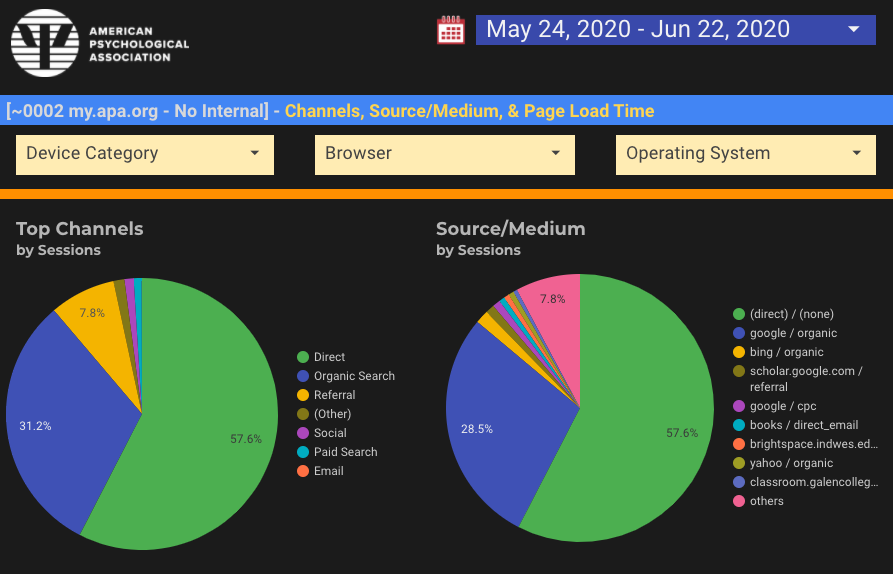
What are the top traffic channels for APA's web applications?
Understanding how people come to your site or application is one of the most essential skills to have as a digital marketer.
You can find the channel breakdown in Google Analytics under Acquisition > All Traffic > Channels. The Channels report shows traffic sources including Direct, Organic Search, Social, Email, Referral, and Paid Search.
Flip the card over to see which traffic channels brought the most visitors to APA's main web applications.
GA Traffic Channels
Channels in Google Analytics are high-level categories indicating how people found your site. While the Source/Medium report shows you in more detail where people came from, Channels are broader, more “user-friendly” names lumping visits together in buckets useful for high-level reporting categories.
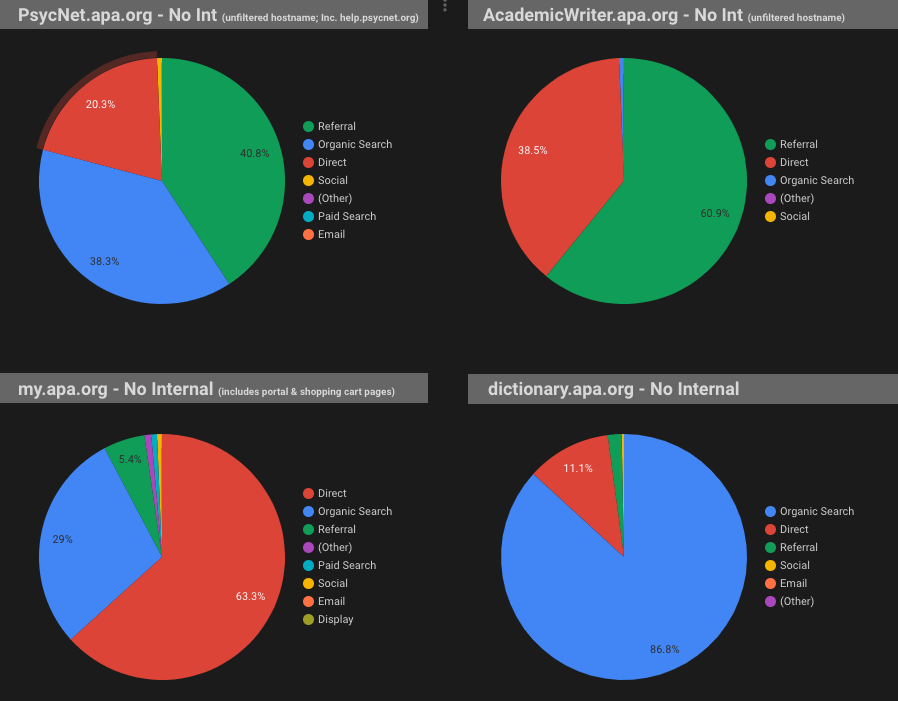
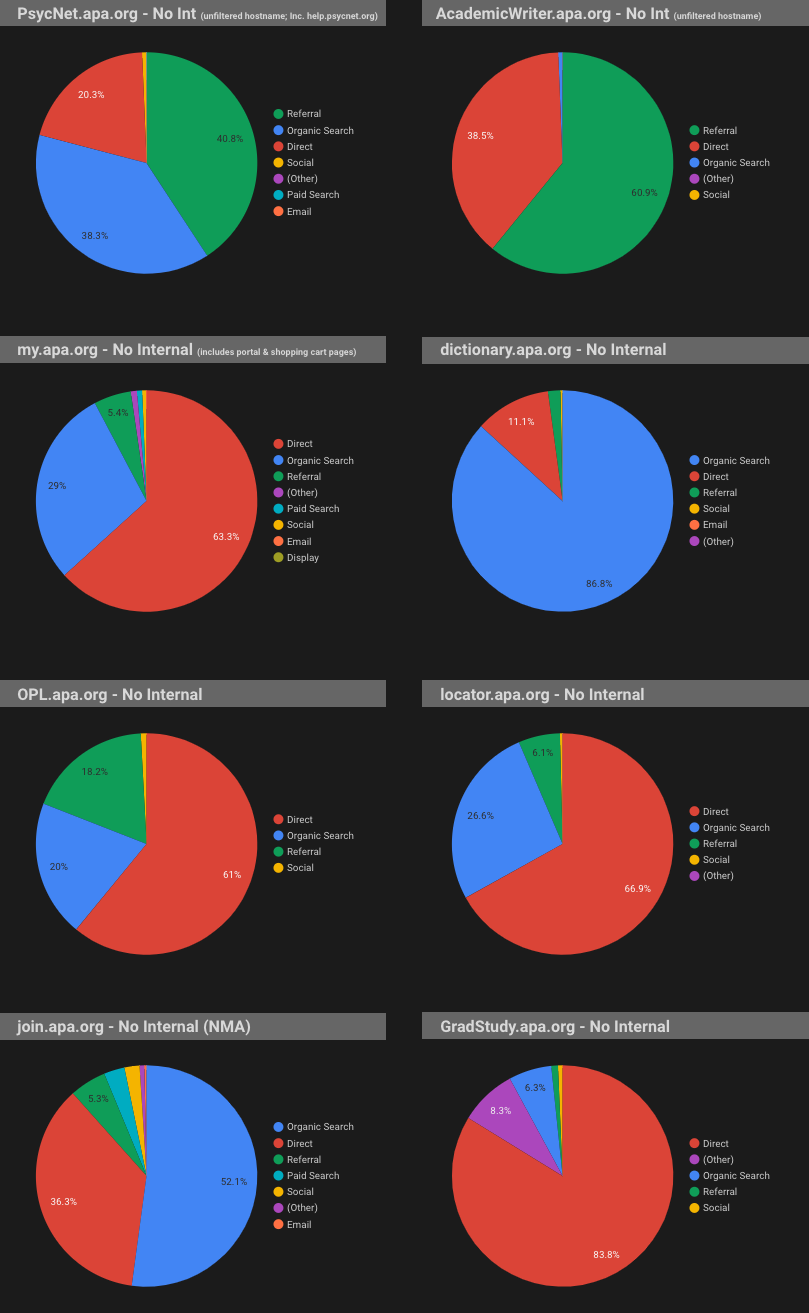
While some of APA's web applications, such as APA PsycNet, have a variety of traffic channels bringing visitors to the application (e.g., a mixture of Referral, Organic Search, and Direct traffic), other applications are dominated by a single channel (e.g., the Dictionary of Psychology app, where Organic Search accounts for nearly 90% of all visitors).
Traffic Channels to APA's Main Web Applications, 1-1-2020 to 4-30-2020
More About Channels
Google launches featured snippet to web page content highlight feature
After years of testing, Google now launched the featured snippet to web page highlight feature.
For the past couple of years Google has tested highlighting content on a web page based on clicking on a featured snippet from the Google search results. This was being tested both on desktop and mobile. This is now live and works on most Google featured snippets and on most web browsers.
Learn more on the back of this card.
Google Search - Featured Snippet Highlighting
“Clicking a featured snippet takes the user directly to the featured snippet text on the source web page. This happens automatically. There’s no markup needed by webmasters to enable a featured snippet. If a browser doesn’t support the underlying technology needed, or if our systems can’t confidently determine exactly where within a page to direct a click, clicking a featured snippet will take a user to the top of the source web page.” (Danny Sullivan, Google)
Why we should care. With this, searchers may skip down past ads and/or call to actions to jump directly to the relevant content. SEOs should take measures to track if your site is doing this in Google search, and possibly replace your ads/call to actions in a more appropriate location.
Read Full Article